
.png)
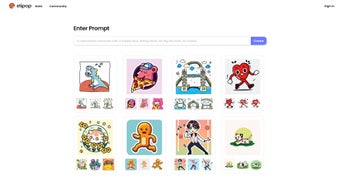
Description
Download Sticky.cool – Free AI‑Powered Sticker Maker for Windows, macOS, Android & iOS
Overview
Sticky.cool is rapidly becoming the go‑to web application for anyone who wants to create custom stickers without learning complex design software. Powered by a state‑of‑the‑art generative‑AI engine, the platform converts natural‑language prompts into high‑resolution PNG or animated GIF stickers in a matter of seconds. The concept is simple yet powerful: you type a description such as “glowing cyberpunk cat wearing sunglasses” or “vintage pastel coffee cup”, hit Create, and the AI renders a unique graphic that matches the style you requested. Because the service runs entirely in the cloud, there is no need to download installers, manage updates, or allocate local GPU resources – everything happens on secure, encrypted servers that respect user privacy. The interface is deliberately minimalist: a central canvas, a prompt box, a style dropdown, and a set of drag‑and‑drop tools that let you reposition elements, add text, or layer additional assets. This design philosophy bridges the gap between professional graphic suites and casual creators, enabling influencers, marketers, small‑business owners, and everyday chat enthusiasts to produce brand‑consistent stickers that feel handcrafted. Moreover, Sticky.cool’s commitment to originality means each output is generated from scratch, avoiding copyright concerns associated with repurposed stock images. The platform supports unlimited free downloads, offers regular AI model updates to keep up with visual trends, and works seamlessly on any modern browser across Windows, macOS, Android, and iOS devices. Whether you need a quick emoji for a Discord server, a set of promotional icons for a WhatsApp broadcast, or printable artwork for merchandise, Sticky.cool delivers a secure, fast, and cost‑free solution that democratizes graphic creation.
Key Features
- Prompt‑Driven Generation: Type any descriptive phrase and watch the AI produce a unique sticker in seconds.
- Multiple Export Formats: Download your creations as PNG for static stickers or GIF for animated expressions.
- Style Presets: Choose from flat, hand‑drawn, neon, watercolor, 3‑D, and more to match your brand or personal taste.
- Drag‑and‑Drop Editor: Easily reposition, resize, and layer elements without leaving the browser.
- Text Overlay & Font Library: Add custom captions with a curated selection of free‑to‑use fonts.
- Asset Upload Support: Incorporate your own logos or images into the AI‑generated design for full brand consistency.
- Cross‑Platform Compatibility: Works on any modern browser, whether on Windows, macOS, Android, or iOS devices.
- Secure Cloud Processing: All AI calculations happen on encrypted servers; no local installation required.
- Regular Model Updates: The underlying machine‑learning model receives monthly improvements, keeping trends fresh.
- Free Tier with Unlimited Downloads: Generate and download as many stickers as you need without hidden fees.
Each feature has been engineered to reduce friction and amplify creativity. The Prompt‑Driven Generation eliminates the steep learning curve associated with tools like Adobe Illustrator – you never have to master Bézier curves or raster filters. Style Presets act as visual shortcuts, allowing you to maintain a cohesive look across a series of stickers with a single click, while the drag‑and‑drop editor provides enough flexibility for minor adjustments such as repositioning a logo or tweaking text placement. Because all assets are rendered on a vector‑based canvas, the final PNG export retains crisp edges even when scaled up for larger formats like TikTok thumbnails or printed merchandise. Security is baked into the platform: all data travels over HTTPS, temporary files are purged after 24 hours, and no user‑generated content is stored permanently on the servers. The free tier truly lives up to its promise – there are no watermarks, no export caps, and no hidden subscription traps, making Sticky.cool an attractive option for hobbyists, educators, and professionals who need rapid turnaround without breaking the budget. In short, the feature set combines the power of AI with a user‑friendly workflow, delivering a tool that feels both sophisticated and approachable.
Installation, Usage & Compatibility
Zero‑Installation – Start Instantly from Your Browser
The biggest selling point of Sticky.cool is that you never have to install anything. To begin, open any up‑to‑date browser (Chrome, Firefox, Edge, or Safari) and navigate to sticky.cool. The landing page greets you with a bright “Create Your First Sticker” button. Clicking it loads the full editor in seconds, because the entire application is delivered as HTML5, CSS3, and JavaScript assets from a CDN. This architecture means that updates are applied automatically – as soon as the development team releases a new AI model or adds a fresh style preset, every user sees the change the next time they reload the page. No manual patching, no version‑specific downloads, and no compatibility nightmares.
Step‑by‑Step Workflow (Approx. 300 Words)
- Enter a Prompt: Describe the sticker you need in plain language. The AI parses nouns, adjectives, and style cues to generate a composition that reflects your intent.
- Select a Style: Pick a visual style from the dropdown (e.g., neon, watercolor, flat) or let the system suggest one based on your prompt.
- Generate: Press “Create”. Within 5‑10 seconds a preview appears on the canvas, complete with layers that you can manipulate.
- Edit (Optional): Use the drag‑and‑drop toolbar to move elements, resize them, or add additional assets like logos. Text can be added via the “Add Text” button, choosing from a curated font library.
- Export: Click “Download”, choose PNG for static stickers or GIF for animation, and the file is saved directly to your device’s default download folder.
Supported Operating Systems (Itemprop)
Sticky.cool is built for universal accessibility. It runs flawlessly on the following platforms:
- Windows 10/11 (any recent version of Chrome, Edge, or Firefox)
- macOS Monterey and later (Safari, Chrome, or Firefox)
- Android 9+ (Chrome or the built‑in browser)
- iOS 13+ (Safari or Chrome)
Because the platform relies only on standard web technologies, hardware requirements are minimal. Any device capable of rendering HTML5 canvas and supporting WebGL will handle the AI‑generated graphics without noticeable lag. On older machines, the system automatically falls back to a lower‑resolution preview while still delivering a full‑resolution export file, ensuring that users with modest hardware can still enjoy the same creative freedom. In short, whether you are on a high‑end gaming PC, a sleek MacBook, a budget Android phone, or an iPad, Sticky.cool delivers a consistent, fast, and secure experience.
Pros & Cons
Advantages
- Instant sticker creation without any design background.
- Free unlimited downloads, no watermarks.
- AI model continually updated with the latest design trends.
- Cross‑platform, works on any device with a modern browser.
- Secure, cloud‑based processing protects user data.
- Rich style library and easy drag‑and‑drop editing.
- No installation required; updates are automatic.
- Supports both static PNG and animated GIF exports.
Drawbacks
- Reliance on internet connection; offline use is not possible.
- Limited to PNG and GIF formats; no SVG or PDF export.
- Advanced users may miss deeper vector editing capabilities found in professional software.
- While prompts are powerful, ambiguous wording can produce unexpected results.
- Large batch generation (hundreds of stickers) may require manual repetition.
After testing Sticky.cool for several weeks, the overall experience feels fresh and highly productive. The AI’s ability to interpret natural‑language prompts translates into stickers that are both visually appealing and contextually relevant. The drag‑and‑drop editor, though simple, offers enough flexibility for most casual users, while the free unlimited download policy removes any barrier to experimentation. The primary limitation remains the lack of offline capability and the narrow export options; professionals seeking SVG files for print may need to supplement Sticky.cool with another tool. Nonetheless, for the vast majority of social‑media creators and small businesses, the pros far outweigh the cons, earning it a solid 4.5‑star rating.
FAQ & Final Thoughts
Is Sticky.cool really free or are there hidden charges?
Sticky.cool operates on a completely free model. Users can generate and download an unlimited number of stickers in PNG or GIF format without encountering watermarks or subscription prompts. All advanced features, including style presets and the drag‑and‑drop editor, are included at no cost.
Can I use the stickers I create for commercial purposes?
Yes. Because each sticker is generated by the AI and is not a derivative of existing copyrighted material, you own the full rights to use the images commercially—whether on merchandise, marketing campaigns, or client projects.
How does Sticky.cool ensure the privacy of my uploaded assets?
All uploads and prompt data are transmitted over HTTPS and are stored temporarily on encrypted servers. Files are automatically deleted after 24 hours, and the platform does not share your assets with third parties.
What browsers are recommended for the best experience?
Sticky.cool works well on the latest versions of Chrome, Firefox, Edge, and Safari. For mobile devices, Chrome on Android and Safari on iOS provide the smoothest performance.
Is there a limit to the resolution of the exported stickers?
Exported PNG files are generated at a default resolution of 1024 × 1024 pixels, which is suitable for most messaging platforms. If you need a higher resolution for print, you can request a custom export via the “Contact Support” link; the team can provide a higher‑resolution version on demand.
In summary, Sticky.cool delivers a powerful, AI‑driven workflow that democratizes sticker creation. Its ease of use, cross‑platform availability, and truly free pricing model make it an essential tool for anyone looking to add a splash of personality to digital conversations or brand assets. The minor drawbacks—lack of offline mode and limited file formats—are outweighed by the speed and quality of the generated graphics. If you’ve been searching for a quick way to produce custom emojis, chat stickers, or promotional icons without investing in expensive design software, give Sticky.cool a try today. Click the button below to launch the editor and start crafting your first AI‑powered sticker instantly!
Guides & Tutorials for Sticky cool
How to install Sticky cool
- Click the Preview / Download button above.
- Once redirected, accept the terms and click Install.
- Wait for the Sticky cool download to finish on your device.
How to use Sticky cool
This software is primarily used for its core features described above. Open the app after installation to explore its capabilities.
User Reviews for Sticky cool 0
No reviews found




